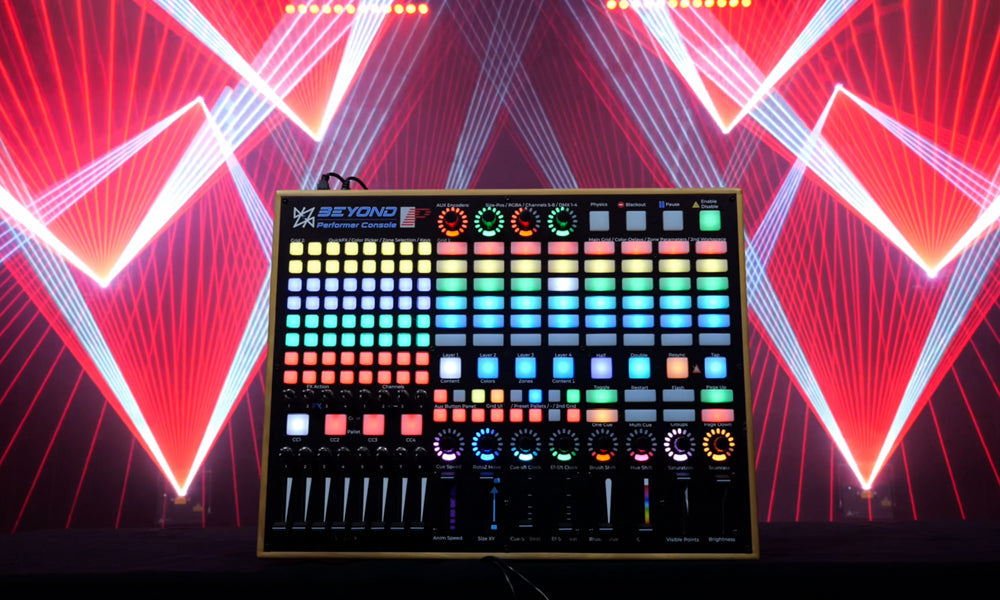
Pangolin Laser Systems is proud to announce the BEYOND Performer Console. A custom-laid-out MIDI controller designed from scratch to enhance and streamline your live laser show experience inside BEYOND.
After extensive development and collaboration with professional laser designers, we are thrilled to offer a tool that truly feels like an extension of BEYOND itself. With intuitive control layers, tactile performance tools, and full MIDI-mapping flexibility, the BEYOND Performer Console empowers artists to perform with speed, confidence, and creative freedom.
Pre-orders are open now, with a limit of 50 units available in this run. Units will be shipped in February.
Pre-order your console by visiting: https://pangolin.com/performer-console
Watch the official product trailer:
Built by laser performers, for laser performers
Originally created as a personal passion project by our own Creative Director Lyra Letourneau, the BEYOND Performer Console has evolved into a full product release thanks to overwhelming interest from the laser community. Carefully designed around the way you already use BEYOND for live laser performances, it gives you a dedicated, performance-ready surface that helps take your shows to the next level.
This custom MIDI controller utilizes multiple grids, fader and encoder banks, and goes four layers deep in control. It’s been designed so that when you’re ready to perform, it immediately feels like home.
Divided into four powerful layers, this console gives you access not only to the things you already do in BEYOND, but also to a set of included “plugin” tools, all laid out in a progressive, performance-ready format that feels natural for both beginners and experts.
Where Creativity Meets Control – MIDI Map Layout
Layer 1: Content

Layer 1 provides access to your main workspace grid along with quick FX layers. The grid lets you trigger the content you use most often, while the auxiliary encoders give you control over geometric live effects, letting you adjust size, rotation, oscillation, and other parameters during a show.
Layer 2: Colors

Layer 2 focuses on color control, giving you quick access to individual color channels, white + color combinations, palette selections, and color-related FX tools. This includes direct access to the color picker plugin so you can quickly adjust or shift cue colors during live performance.
Layer 3: Zone Tools

Layer 3 provides tools for controlling projection zones, including zone selection, zone flips, symmetry, and directional selection tools. This allows you to work efficiently with multi-zone environments, quickly choosing where content is displayed or how zones should be arranged.
Layer 4: Content

Layer 4 gives you a secondary content workspace, allowing you to use an additional grid for things like background looks, alternate content, or “drop” effects. This lets you layer separate sets of cues or maintain auxiliary content while keeping your main workspace active.
MIDI Map and Plugins

In addition to the four layers, the console includes access to BEYOND’s built-in plugin functions, such as the color picker, custom workspace tools, perfect delays, and zone flips and selections. Because the controller is fully MIDI-based, all mappings can be edited, customized, or expanded to support future BEYOND updates.
Not only does this controller include many of the familiar functions you’d expect from a standard MIDI surface, it also comes with multiple plugin-style functions built in, enabling incredibly easy delay effects, color picking, and FX you may have always wanted to add to your show but weren’t sure how. Everything is bundled together in a progressive layout, allowing users to learn as they go and grow from beginner to expert.
Flexible, Future-Proof, and Fully Yours
One of the best parts of the BEYOND Performer Console is that it’s still fundamentally just a MIDI controller.
That means:
- You can add your own macros, functions, and tools just like any other MIDI device.
- If one function isn’t your style, you can swap it for something else.
- As BEYOND evolves, we can create future mapping to extend the life and capabilities of the unit.
This flexibility ensures that the Performer Console grows with you, your shows, and the software.
MIDI Mapping Course Included Free with Purchase
With the purchase of the console, you’ll receive access to the new MIDI Mapping course, free of charge.
Divided into practical lessons, this course will help you:
- • Understand the default mapping
- • Learn how each layer and plugin is structured
- • Modify and expand the mapping to fit your personal performance style
In short, it’s everything you need to take your own performances to the next level.
Learn More and Get Started
Product Wiki & Documentation
For full technical details, layer breakdowns, and additional information: https://wiki.pangolin.com/doku.php?id=beyond:beyondperformerconsole
How to Use the BEYOND Performer Console (Video Tutorial)
How to Pre-Order
The BEYOND Performer Console is available now for pre-order in a limited run of just 50 units worldwide, with shipping in February. Once this initial batch is reserved, no additional units will be produced for this production cycle.
Pre-order today at: https://pangolin.com/performer-console, or send us an email at hello@pangolin.com.
If you know the BEYOND Performer Console belongs in your show setup, we strongly encourage reserving your unit early.